หน้าแรก/บทความ/Eclipse Android error: An SDK Target must be specified.
กลับหน้าบทความ
🤖Android

Eclipse Android error: An SDK Target must be specified.

แก้ปัญหา Error 'An SDK Target must be specified.' ตอนสร้าง Android Project บน Eclipse เกิดจาก Eclipse ไม่สามารถหาโฟลเดอร์ติดตั้ง SDK เจอ

ศิริชัย ธีรภัทรสกุล (ตั้ม)อ่าน 2 นาที7 กันยายน 2554
#Android#Eclipse#SDK#Error#Fix

พอดีเจอปัญหา Error "An SDK Target must be specified." ในขณะที่เริ่มต้นสร้าง Android Project บน Eclipse
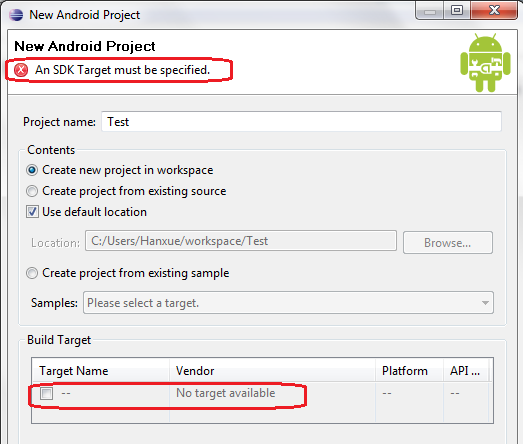
Eclipse Android error: An SDK Target must be specified.

Error ดังกล่าวเกิดจาก Eclipse ไม่สามารถหาโฟลเดอร์ติดตั้งของ SDK เจอ ดังนั้นเราต้องไปกำหนดให้ Eclipse รู้เสียก่อน

วิธีแก้ไข

  1. เข้าไปที่เมนู Window → Preferences
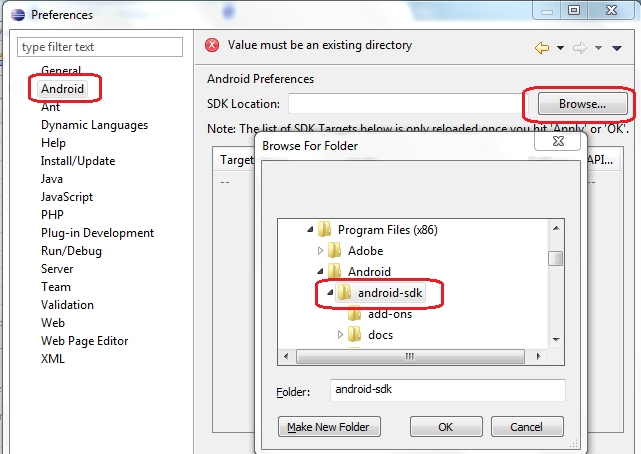
  2. จะมีหน้าต่างใหม่ขึ้นมา ให้เลือก Android (ด้านซ้าย)
  3. กดปุ่ม Browse เพื่อเลือกโฟลเดอร์ SDK ที่ Download และติดตั้งไว้
  4. กด Apply และกด OK

Eclipse Preferences window open with Android selected in the left sidebar, showing the Android Preferences panel with an SDK Location field and a Browse button highlighted in red. A Browse For Folder dialog is overlaid, displaying a folder tree navigating to Program Files x86, Android, android-sdk, which is highlighted in red. The folder tree also shows subfolders add-ons and docs. At the top of the Preferences window, an error message reads Value must be an existing directory. The Folder field at the bottom of the dialog shows android-sdk with Make New Folder, OK, and Cancel buttons. หลังจากนั้น Eclipse จะสามารถหา SDK Target ได้และสร้าง Android Project ได้ตามปกติ

🚀 รับพัฒนาเว็บไซต์ & เว็บแอพพลิเคชั่น

สนใจดูตัวอย่างงานหรือสอบถามเพิ่มเติม ติดต่อได้เลยครับ โค้ดโมทีฟ (CodeMotive)